
Read the judgements from a photo
From a result photo it records the score, and the judgement counts and timing too.
941,450Marvelous 181Perfect 58Great 16Good 3Miss 12±20.6
Records your DDR result images automatically, down to the judgement breakdown. A web app where your memos and history decide the next chart to practise
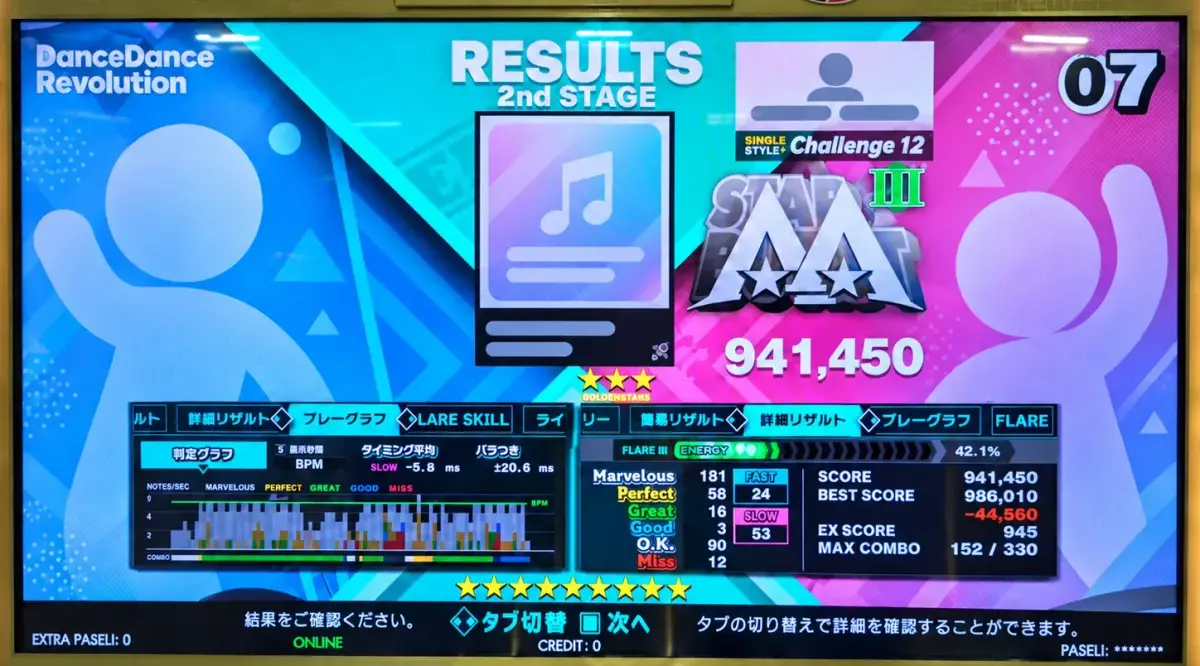
Detailed judgements and breakdowns only show on the result screen, and you cannot check them afterwards.
You remember a play best right after it ends. Where it got hard and whether it needs study are forgotten unless you write them down.
Most of that history is lost, so you cannot tell whether you are stuck or improving.
Take a photo, and you can check all of it later.
How it works
DDR Album is not a score tracker.It keeps the judgement breakdown and timing too.It is a play manager that records your result history and helps you analyse the next step.
Photograph and upload the result screen. Detailed judgements are recorded automatically, and you can add memos, tags and judgement timing.
Plays on the same chart are grouped into one history so you can follow the trend. Whether you improved shows in the difference between the recorded numbers.
Find what to work on and plan ahead. Mark each chart study required, practice required or practice ready to keep what you do away from the machine apart from what you try on it. The distance to your next FLARE IX is always visible.
What you can do
From a result photo it records the score, and the judgement counts and timing too.
Every play on a chart lands in the same place, so score and judgement trends are one tap away.
See how many notes are left for an FC or the next FLARE IX, and filter for charts you have not played lately.
Your last memo, whether the chart needs study (prep away from the machine), the judgement timing — everything you want to check before picking a song.
Read your records from MCP clients such as ChatGPT or Claude and ask which chart to tackle next. The same records are also available over the public API.How to connect
Before you decide what to play next, filter a chart's records by condition. See how the score and judgements moved between settings, play against play.
Pick the milestone you are aiming for and the challenge candidates narrow down. See how many notes still need a better judgement for an FC or FLARE IX, and choose the charts to grind before the event.
Before you stand at the cabinet, compare the Fast / Slow balance and the timing dispersion against the judge timing you recorded, and decide the setting from your own records.
Open a chart's history and the falling timing dispersion, the rising Marvelous count and the EX SCORE trend line up. See the change a plain score hides, play against play.
A single photo keeps it all, down to the judgement breakdown.